- systemctl command – Only works on systemd based Ubuntu like version 16.04 LTS and above.
- /etc/init.d/apache2 – A sys v init style script to start / stop / restart the Apache2 service under Debian or Ubuntu Linux.
- service command – This command work in most Linux distributions including Debian and Ubuntu.
- upstart command – Only works on certain version of Ubuntu.
- apache2ctl command – This method should work on all Linux and Unix likeoperating systems.
Method #1: systemctl command examples
To start Apache 2 on Ubuntu Linux LTS 16.04 LTS or the latest systemd based Ubuntu Linux, type:$ sudo systemctl start apache2.service
To stop Apache 2 on Ubuntu Linux LTS 16.04 LTS or the latest systemd based Ubuntu Linux, type:$ sudo systemctl stop apache2.service
To restart Apache 2 on Ubuntu Linux LTS 16.04 LTS or the latest systemd based Ubuntu Linux, type:$ sudo systemctl restart apache2.service
To status of start/restart/stop operation, enter:$ journalctl -u apache2
To find out whether Apache 2 running or not, enter:$ sudo systemctl status apache2.service
Sample session: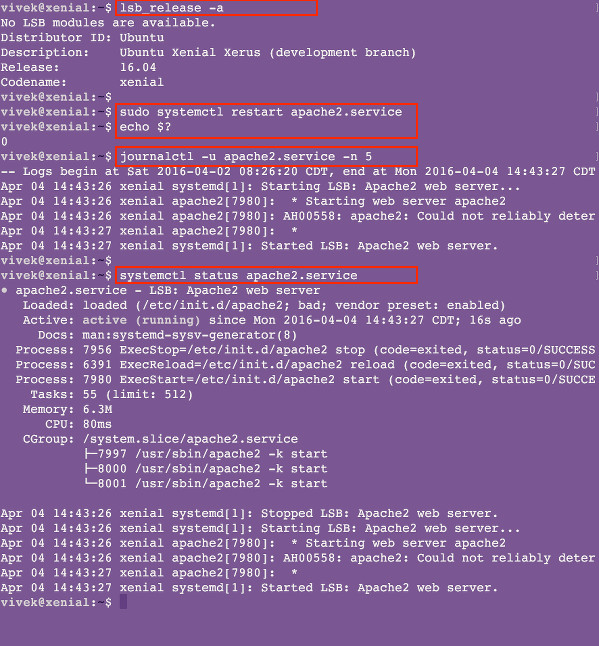 Fig.01: Ubuntu Linux systemctl start/stop/restart Apache server (systemd)
Method #2: /etc/init.d/apache2 command examples
You need to login as root user or use the sudo command to control Apache web-server.Task: Start Apache 2 Server
# /etc/init.d/apache2 start
or$ sudo /etc/init.d/apache2 startTask: Restart Apache 2 Server
# /etc/init.d/apache2 restart
or$ sudo /etc/init.d/apache2 restartTask: Stop Apache 2 Server
# /etc/init.d/apache2 stop
or$ sudo /etc/init.d/apache2 stopMethod #3: service command examples
To restart Apache 2, enter:$ sudo service apache2 restart
To stop Apache 2, enter:$ sudo service apache2 stop
To start Apache 2, enter:$ sudo service apache2 start
To gracefully reload Apache 2, enter:$ sudo service apache2 reloadMethod #4: upstart command examples
The following commands only works with certian version of Ubuntu such as Ubuntu Linux LTS 12.04 and 14.04. To start Apache 2 on Ubuntu, run:$ sudo start apache2
To stop Apache 2 on Ubuntu, run:$ sudo stop apache2
To restart Apache 2 on Ubuntu, run:$ sudo restart apache2
To gracefully reload Apache 2 on Ubuntu, run:$ sudo restart apache2Method #5: apache2ctl command examples
apache2ctl is Apache HTTP server control interface command, which can be used to stop or start web server under any Linux distribution or UNIX.
To start Apache 2 on Ubuntu, type:$ sudo apache2ctl start
To stop Apache 2 on Ubuntu, type:$ sudo apache2ctl stop
To restart Apache 2 on Ubuntu, type:$ sudo apache2ctl restart
To gracefully reload Apache 2 on Ubuntu, type:$ sudo apache2ctl graceful
Tuesday, 20 December 2016
Start / Restart / Stop Apache Web Server
How do I start, restart, or stop Apache 2.x web server on Ubuntu Linux operating systems using command line options?

Subscribe to:
Post Comments (Atom)
No comments:
Post a Comment